Forum Replies Created
-
AuthorPosts
-
Stefano
KeymasterI have just emailed you the new version but it’s unlikely it will fix the issue. If you want to provide me with a temp admin account on your site, I can try to fix the issue myself 🙂
KeymasterHowever, notice that setting the IPN URL is not needed, as Post Pay Counter dynamically sets it for every transaction. Setting it in your account will make PayPal use it to confirm EVERY transaction you make on any website (even on ebay, for example). This is not good, since my plugin only handles confirmations for requests performed through it. Several requests to your server from PayPal could then go astray and PayPal would complain to you by email.
You could probably have more luck in checking that there no conflicts with rewrite rules with Rewrite Rules Inspector 🙂
KeymasterFor some reason, the update server was still serving the old version, though it notified the new one. I should have now fixed the issue and you should be able to update.
However, the update is unlikely to fix the issue. Can you try with just [ppc] as shortcode and see what is the result?
KeymasterIt should be yoursite.com/ppcp/paypal. For example, for this site, it’s http://postpaycounter.com/ppcp/paypal.
Please let me know if this fixes the issue, as this could be helpful to others! 🙂
KeymasterHi Lordo,
- do you see data in the backend stats page for that same time range and for your user?
- What version is displayed in the plugin Options page, in the upper-right corner?
Have a nice day,
StefanoKeymasterHi Ryan,
the PayPal Verified badge is acquired through the PayPal IPN feature (Instant Payment Notification). This requires that the feature is enabled in your PayPal account and that your server is ready to handle requests coming from PayPal carrying the transactions confirmation. However, I’ve seen issues with this feature more often that not, and was even thinking of getting rid of it at some point in the future…Check that your PayPal account has IPN active and try to go to your wp-admin, then Settings > Permalinks and just save settings, without changing anything. This may help solving.
Hope this helps! 🙂
Have a nice day,
StefanoKeymasterI talk about site revenue share and not post revenue share.
I understand your needs, but I’m not sure such an addon will ever be released. I think few people would need it and building it would actually take quite some time, sorry! 🙂
KeymasterSo for now i need something that can give my site admin extra bonus by giving percentage from the total site earning from adsense for motivation to them to do more hard works for the site.
The PRO version already allows you to do that, see this tutorial. However, as I said, it will only share with users revenues generated by ads placed on their posts pages (for example, revenues coming from ads on the homepage aren’t included) 🙂
KeymasterHi Lordo,
I replied to your other topic, let me know (there please!) if further clarification is needed 🙂Have a nice day,
StefanoKeymasterHi Lordo,
the PRO version allows you to share a percentage of Adsense revenues generated by posts. Every user only gets part of the revenues generated by their own posts. You can enable and tweak the percentage for each user, but if you need to give the same settings to all editors, or all admins, (or to a whole user role, anyway), you can use the User Roles Custom Settings addon. From your other post I can see you also wanted to ensure authors always have a fixed salary, and to add bonuses on top of it. In that case, Author Basic Payment will allow you to achieve that as well.I should also mention that if you purchase 3 addons at once, you automatically get a 10% discount on the whole amount! 🙂
Have a nice day,
StefanoKeymasterCould you post a screenshot please? 🙂
KeymasterHi Tindaro,
you need to go to the edit page for single posts and look for the Post Pay Counter Stats box to award a bonus. If you don’t see the box or don’t see the field to award the bonus, double check both features are enabled in the Miscellanea box and that your permissions allow you to make use of them 🙂Have a nice day,
StefanoKeymasterI don’t know, you seem to be experiencing issues quite weird and that were not reported by no other user. I would think of a conflict with some new plugin, but it may not be the case. What I can do for you at this point is to be available on Skype and see if we can get a glimpse of what’s going on together 🙂
Have a nice day,
StefanoKeymasterHi Alma,
both updates are now out! 🙂You will be required to activate again your license – that was another bug now fixed 🙂
Have a nice day,
StefanoKeymasterHi Tindaro,
I’ve manually extended the license 🙂Have a nice day,
StefanoKeymasterHi Alma,
thanks for the super detailed report.I’ve already fixed the glitch and will release the update later today. Also, you will see a PRO update which fixes another issue with the addon (which yoy may not have encoutered, but better safe than sorry) 🙂
Have a nice day,
StefanoSeptember 29, 2016 at 6:50 pm in reply to: Basic Payment Customizable Per Author – Super Bonus? #52425KeymasterHi Alma,
the new Author Basic Payment addon is available and should work as expected! 🙂Have a nice day,
StefanoKeymasterHowever, how do you propose that I get users to sign up for getting paid until that feature becomes available since I do not allow users to access the WordPress dashboard?
I fear the only way would be to input them yourself, sorry!
Can you provide a feature within the front end where users can see there own earnings, instead of having to go to a page that posts all users earnings; perhaps in their user dashboard within BuddyPress or similar?
Doesn’t the shortcode work for you?
Is there a way for now to allow only logged in users to see there own earnings within the webpage with the [ppc] shortcode?
Doesn’t [ppc author="current"] work?
KeymasterI don’t think it’s a good idea to allow user to have access to the WordPress dashboard, as this can be a security issue with them knowing that your using WordPress. I use a program that keeps users from knowing that my website is a WordPress site.
I can see what you are trying to do, but you want to hide your server setup from bots, not real users. Or, at least, I can’t see any good reason to not let them know you use WordPress.
However, notice that a lot of your links (for logging in, writing content…) still have the wp-admin slug on it, so I could easily tell you run WP. Just something that may have slipped 🙂
However, me website does have a user dashboard where they can change or update their email address.
Yes, I see it’s done with BuddyPress. As of now, Post Pay Counter only allows PayPal email to be input from their wp-admin profile page. This choice was made since the profile page is accessible to all user roles. However, more and more webmasters are locking the wp-admin area to their users, and moving everything to the front end. This is a trend that I don’t understand and which I don’t see the sense of, but yet, it’s there. So I will probably provide integration with at least BuddyPress in future releases. I can’t provide a time frame in which it will be done though.
So how do I tell my potential users that they can get paid to post? I was hoping that your plugin had an add-on that would indicate to users that they could apply to be a contributor and earn money for posting within the profile page, and add a PayPal email address. Is this not the case? Are we supposed to reach out to every potential user of the website and ask if they want to make money? I was thinking that this would be taken care of within the plugin somehow.
You’d probably want to have a look at the shortcode feature, which allows you to display stats and payments in the frontend, wherever you like. The only thing that is left out from that is the PayPal email 🙂
I hope this helps understanding 🙂
Have a nice day,
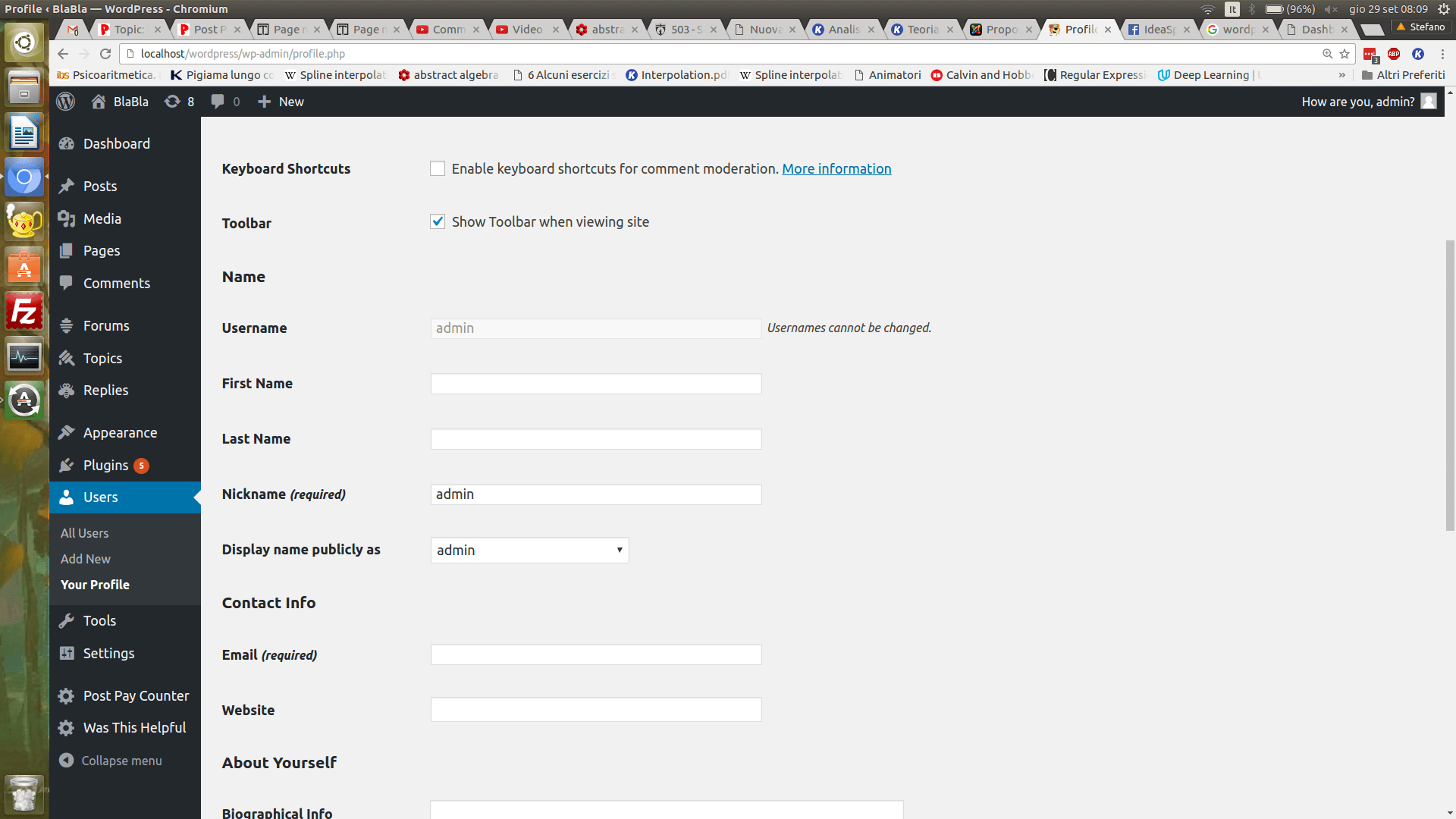
StefanoKeymasterUsers can input their PayPal email address in their wp-admin profile page, which seems unreachable on your site. Is there any way users can reach it? There is screenshot attached here displaying that page 🙂
Attachments:
-
AuthorPosts