Forum Replies Created
-
AuthorPosts
-
October 29, 2016 at 11:04 am in reply to: Did not receive a Post Pay Counter PRO – license key with purchase #52874
Stefano
KeymasterHi Jeremy,
I have just resent you your purchase receipt 🙂Have a nice day,
StefanoKeymasterHi Syed,
#2. Count of Total Posts Published in the given time range i.e Current Month, last week, previous month or any other.
I thought this was already there, but in fact it wasn’t! I have just added the count at the bottom of the table, you will see it with the next release 🙂
#3. Count of Total UPV of the post so far ( the value of Visits that the report currently displays against each Pots Title is for the current time range, I suppose. So I want my writers to also know how many visits so far over the period since it was published i.e say Total Over All Visit till date for the post Title is 1200 and in this month 350 visits)
Actually, visits values are overall figures, they are not related to the selected time range. So it’s always all-time 🙂
#1. Count of Total Posts Published so far irrespective of the selected time range
#4. A very important one: A writer who has not published any post, say in the current month, will not see any data in the report. I want that irrespective of whether the writer has published any post in the selected time range or not, if any of his previously published post has any UPV in the selected time range, it should be displayed and counted.
There’s just no way the plugin will display data from outside the given time range. If you want to see more posts, you have to pick a wider time range. There’s just no other way, sorry!
Also I would like to know how to round-off the payment and adsense amounts without any decimals.
This is not possible as well. All non integers values are rounded to two decimals, and that’s hardcoded in the plugin 🙂
Have a nice day,
StefanoKeymasterActually, I may be way ahead than I had thought. You can see a screenshot of the work in progress attached. I won’t provide a deadline anyway, but a basic version of the addon could be available in a week or so! 🙂
Attachments:
KeymasterHi Jeremy,
Do you have an ETA on a Buddy Press PayPal signup feature?
Sorry, but no. Lately, I have been working on bringing pagination and sorting to the stats table, which seemed to me more urgent matters than the BuddyPress integration. I understand that BuddyPress is urgent to you, and I hope to start working on it soon, but I can’t provide a deadline unfortunately. I’m hoping to get it done in a month or so, but it depends on how much “ordinary work” I have to do, I’m afraid 🙂
Have a nice day,
StefanoKeymasterHi Nelson,
are you sure your license is correctly activated (see the License Status box)? Have you done anything special in between when it was displayed and now? Can you maybe post a screenshot of your Options page? 🙂Have a nice day,
StefanoKeymasterI have received your payment and I have extended your license to an Unlimited websites one 🙂
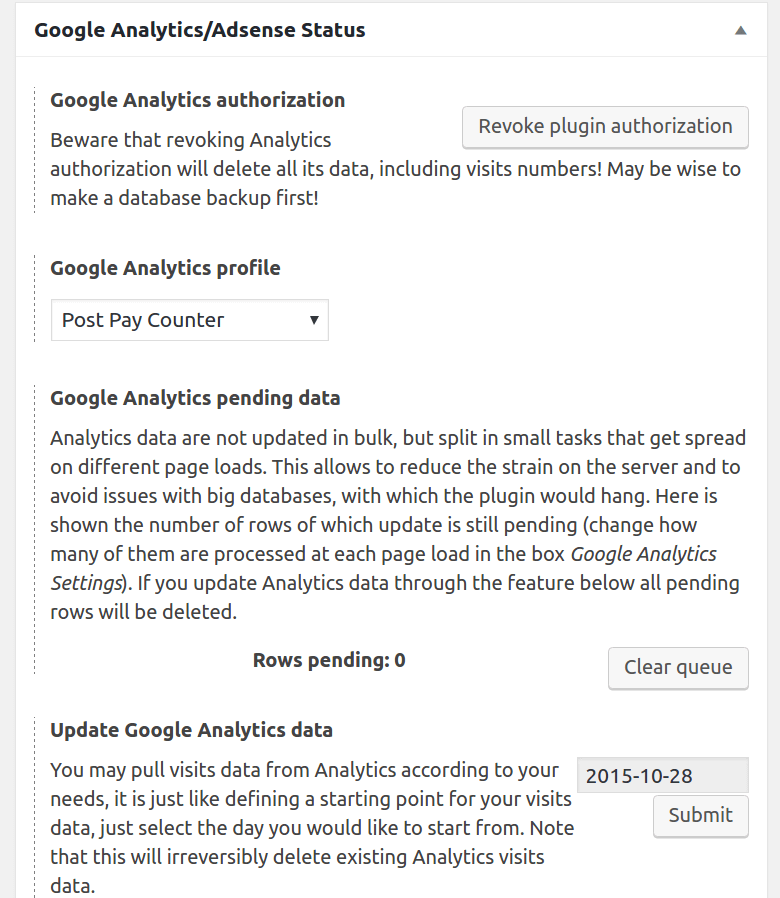
KeymasterI’m attaching a screenshot of the Analytics manual update section, it’s the one at the bottom of the image 🙂
To upgrade your license, you can pay the difference of €40 to the PayPal address webmaster [ at] thecrowned [dot ] org, and I will manually extend your license 🙂
Have a nice day,
StefanoAttachments:
KeymasterTo update Google Analytics data, you can use the apt feature in the Google Analytics Status box in the Options page 🙂
KeymasterHi Lori,
Do data stopped updating just for one day, or has it been going on for several days?If you have nothing to lose (especially if you don’t have a visits time limit), you could consider manually reimporting Analytics data, which usually acts as a reset button for Analytics and helps with this kind of issues.
Have a nice day, 🙂
StefanoKeymasterCan i know how frequently the plugin pull data from google analytic to syncronize the post earning at blog? Any guides or informations page url for reference?
Analytica data is updated every day. You can find more information here 🙂
Have a nice day,
StefanoKeymasterSorry, my fault again. It’s never good to do things in a hurry… Try again now! 🙂
KeymasterDo you already test to use same shortcode in same page?
I did, but forgot to clear again all payments. I’m sorry about that. I have now fixed the issue and pushed version 1.6.7.2. Thanks for your patience 🙂
One more thing, i plan to set minimum total earning for withdrawal and pay writer if their total earning exceed certain amount.
That’s a nice idea! I will see to add that feature in future releases 🙂
Other option, can you add search box at admin dashboard on writer earning stats which admin can search for list of writer which have minimum $xxx total earning to display? So can easily do that action when want to pay writers.
You can use CTRL + F in your browser to search for the author name in the stats page. 🙂 It’s way to difficult and way not worth it to implement a search feature in the plugin itself.
Have a nice day,
StefanoKeymasterSorry, I had actually forgotten to update the version number! Try again in a few minutes 🙂
KeymasterHi Lordo,
all issues should be fixed now. I have just released new versions for both plugins, let me know! 🙂Have a nice day,
StefanoKeymasterHi Lordo,
thanks for all your reportings, I really appreciate it. I’ll troubleshoot all the issues and let you know as soon as I have fixed them.Just one thing: could you explain better number 2? I couldn’t understand what the issue is. What’s the error?
Thanks and have a nice day,
StefanoKeymasterCan you make all coversation with my site screenshoot or details in private.
Sure, sorry! I have just deleted the screenshot 🙂
1. Do you already fix the issue on plugin setting?
I’ve just released the fix now, it may take some time to show up in your Dashboard but it will eventually 🙂
2. Do you already try different shortcode?
Both [ppc] and [ppc author="current"] work on your site, is it something else that’s not working?
KeymasterSorry for the delay.
I created a new private page with the [ppc] shortcode and attached is a screenshot of what I’m seeing for it. It looks fine to me. Don’t you see it the same?
Have a nice day,
StefanoKeymasterYou’re welcome! Thanks for reporting back 🙂
KeymasterHi Syed,
This is thoroughly explained in this tutorial 🙂Have a nice day,
StefanoKeymasterCheck your spam folder as well for the email 🙂
1. Default stats time range will tick at 2 options even changes to different time option. 1 remain unchange.
Yes, you are right, thanks for catching that. I’ve fixed the issue and will release the fix soon.
2. Post earning stats only will show if the post paid and have payment transactions for it. If no any payment, all post (unpaid) will jot show up.
I will see if this is true. Anyway, if you want to give me admin access to your site I can look into the issue myself and have it fixed as soon as I can 🙂 In case, you can post the credentials here marking the post as private as you have already done. I would keep the conversation here because it’s easier to manage for me, sorry, I hope this is not a problem for you! 🙂
-
AuthorPosts