Forum Replies Created
-
AuthorPosts
-
Stefano
KeymasterHi there,
all Adsense related functions are located in classes/ppcp_adsense_class.php.You probably want to look at get_revenue() and get_revenue_payment() 🙂
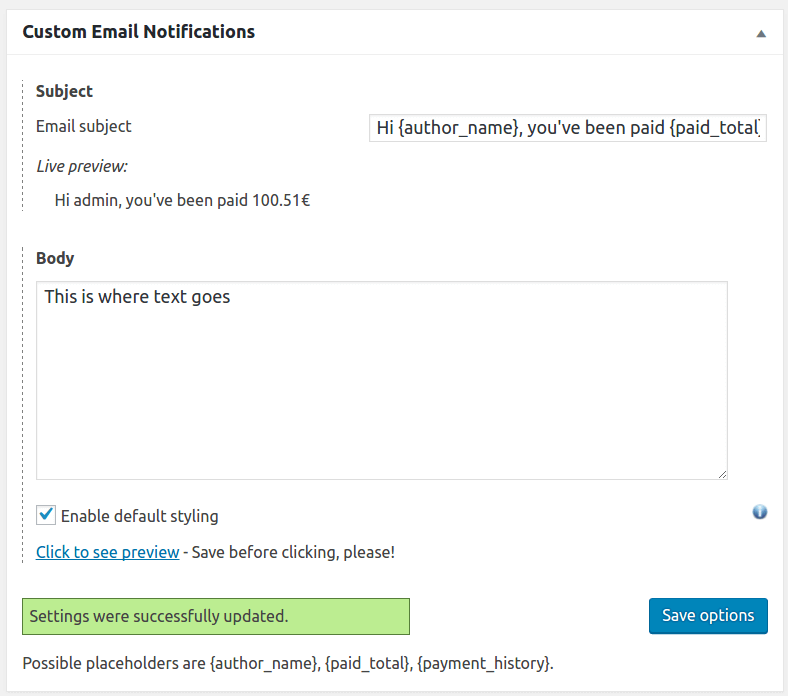
KeymasterHere you go, the new Custom Email Notifications addon is available! 🙂
KeymasterHi guys,
sorry for the delay in the reply.We went into the options and tried to change the date, but now for some reason, we’re getting a “You do not have access to this page” error. We pushed the site to a staging area, deactivated all other plugins, and changed the theme to Twenty Sixteen and we’re still having this issue. It’s really odd. Any ideas on what to try?
This can happen either if PPC is disabled (which doesn’t seem to be your case) or if your user is missing the post_pay_counter_access_stats capability. Maybe you have tweaked permissions with a custom User Role Editor and for some reason you unticked that?
Then I disabled the plugins and re-enabled them … and now I can view the stats. Crazy! The settings were all different, maybe reset to default. But at least I can view stats without crashing the site.
I really have no idea of what could have happened, sorry!
Now I’m re-importing data from Dec. 1 … here’s hoping this was all it took!
Let me know if you need any more help! 🙂
Have a nice day,
StefanoKeymasterHi Tyler,
we have taken extra care in making sure the plugin works with huge websites but, at some point, the plugin simply has to process too much data at once to be able to provide stats in a reasonable time. Anyway, stats page loading should be made difficult by the amount of posts you are trying to load, rather than the amount of visits. The impact the plugin has in relation to Analytics visits can be tweaked in the Analytics settings box by setting a lower number of rows to process per page load 🙂I am here providing you a way that should allow you to load the stats page and determine how much data the plugin can handle on your website at once.
- Go to Options > Miscellanea > Default stats time range, choose Custom number of days and set it to 1.
- Go to the stats page. It should load, displaying only data from one day.
- Tweak the time range, selecting wider and wider time ranges and try to determine how far you may go.
- Another possible option we have conceived for huge sites is the user role picker (or, at worst, the user picker), which allows you to filter out stats per user role (or single user). This allows to reduce the data the plugin has to handle.
We talked to our host, WP Engine, and they said they were seeing thousands of hits on admin-ajax when trying to access the stats page
This sounds weird: there should not be any AJAX requests while loading the stats page…
Does this help?
Have a nice day,
StefanoKeymasterHi Kimberly,
I just wanted to let you know this is now a work in progress (see screenshot for preview) 🙂Have a nice day,
StefanoAttachments:
KeymasterHi Diane,
no, I’m afraid the plugin cannot do that in any way (at least for now), sorry! 🙂Have a nice day,
StefanoKeymasterDo you think we can add this functionality programmatically or you think its simply never going to be possible using this theme?
It will require a bit of custom work, but I think it can be done 🙂
KeymasterOh well, it looks like Anspress is using some kind of non-standard custom post type. It’s doing something that makes WP functions useless (for technical info, see here). All visits/revenues from questions go to the Answer questions page (ID 5). Maybe if questions were not under that page (i.e. the permalink was /would-you-trade-places-with-someone-for-a-day-if-you-could/ instead of /answer-questions/question/would-you-trade-places-with-someone-for-a-day-if-you-could/) it would work, but as it is now, it just won’t work at all. WordPress is not able to fetch the question ID given its permalink, which is essential to map Analytics visits to site posts.
Keymasterwonder if our custom post types are a problem
Probably no. Every post/custom post you see in the stats page will have visits pulled from Analytics 🙂
Keymasterit definitely looks better now but i think it must still not be quite right because the total number of sessions reported in GA is 413 and your reporting shows 303 (only 302 accounted for in the authors)
The difference may come from the fact that Analytics counts visits/sessions site-wide, whereas the plugin keeps track only of pageviews in posts/pages/post types included in stats. So, for example, all pageviews of the homepage are not counted.
i am happy to give you GA access as well but i need an gmail address to add so you can tell me if it looks right to you or not
Okay, I will email you my gmail account. But please, keep the conversation here anyway 🙂
KeymasterOkay, no problem 🙂
I have run a new manual import of Analytics data and it seems to me figures are correct. At least (looking at the logs), data is being correctly drawn from Analytics and processed. If it still doesn’t match your expectations, can you provide a couple screenshots of Analytics figures? In particular, a screenshot of the Analytics dashboard for a post which shows up with a wrong visits number in Post Pay Counter stats.
Have a nice day,
StefanoKeymasterCan I update both plugins to their latest versions or is there any specific reason why you are withholding the update? 🙂
KeymasterOh sorry! I don’t get a notification for private posts so I missed it! I’m going to look into this right now! 🙂
KeymasterOh, sorry, I had misunderstood. There was indeed an issue with front-end stats and the SlimStat addon not being loaded. I’ve pushed version 1.1 of the addon that fixes the issue 🙂
Have a nice day,
StefanoKeymasterA negative amount of views usually means that the specified visits callback does not exist. Please, double check your settings and see if this could be the cause 🙂
KeymasterHi Kevin,
thanks for reporting the issue and sorry for the hiccup!I have just released Post Pay Counter version 2.711 which should fix the issue 🙂
Let me know!Have a nice day,
StefanoJanuary 18, 2017 at 7:00 pm in reply to: Did not received key for Post Pay Counter PRO – license key with purchase #54085KeymasterGreat, glad to know that! 🙂
Have a nice day,
StefanoJanuary 18, 2017 at 6:45 pm in reply to: Did not received key for Post Pay Counter PRO – license key with purchase #54080KeymasterThe Publisher Bonus addon is not included in the premium bundle (everything else you received is instead). Anyway, we do offer refunds within 30 days, so let me know in case!
January 18, 2017 at 6:39 pm in reply to: Did not received key for Post Pay Counter PRO – license key with purchase #54075KeymasterHi Tec,
What you received is correct. In fact, you purchased the Addons Premium Bundle (which is what the PRO version link in the top menu links to), that includes the PRO version together with 3 more addons that complete its features 🙂January 18, 2017 at 6:07 pm in reply to: Did not received key for Post Pay Counter PRO – license key with purchase #54070KeymasterHi Tec,
sorry for the hiccup!I have just resent your purchase receipt. Let me know if it still lacks some information! 🙂
Have a nice day,
Stefano -
AuthorPosts