Forum Replies Created
-
AuthorPosts
-
Stefano
KeymasterHi Anas,
thanks for the information. It’s not too clear, though, because I am using what is the BuddyPress standard function to add a new menu item,bp_core_new_nav_item()https://codex.buddypress.org/developer/function-examples/core/bp_core_new_nav_item/ . This shouldn’t require any particular display function for menus. When does the custom theme require navigation items to be added? Because we do it oninit, so maybe it’s too late for them? 🙂Have a nice day and let’s hope to sort this out,
StefanoKeymasterHi Philip,
if you have installed and activated the PRO version plugin, you may still need to activate your license. You need to enter the license key we sent you with the Purchase confirmation in the License Status box in the plugin Options page (there is detailed info in the email) 🙂Have a nice day,
StefanoKeymasterNo need to, you can deactivate your license in the License status box in the options page and then reactivate it after reinstall 🙂
May 10, 2019 at 1:07 pm in reply to: Questions on "Exclude posts from stats after they are paid" #65019KeymasterWill that post still earning money until it has reached threshold?
No, once a post is paid, with that setting active, it will not earn any more money. The threshold is an upper bound, meaning it cannot earn more than that, but it could also earn less 🙂 Does this explain?
KeymasterHi Chris,
glad the plugin is useful 🙂So, it is not a native feature, but it is possible to achieve it to some extent (and with some little bothering). I’d advise having a look at these two topics and then come back with any questions you may have. Sounds good? 🙂
Have a nice day,
StefanoMay 10, 2019 at 12:28 pm in reply to: Questions on "Exclude posts from stats after they are paid" #65011KeymasterHi Chris,
I’m not sure I got your question, butAccording to the scenario on top with “Exclude posts from stats after they are paid” disabled, will the same post appear in the next request payment?
No, regardless of anything else, once a post is marked as paid once, it just does not accumulate any more due payment. Does this answer? 🙂
Have a nice day,
StefanoKeymasterGrazie per l’articolo. Uhm, a me WordPress conta 392 e PPC 374 (screenshot allegato). A me WordPress è diverso?
Attachments:
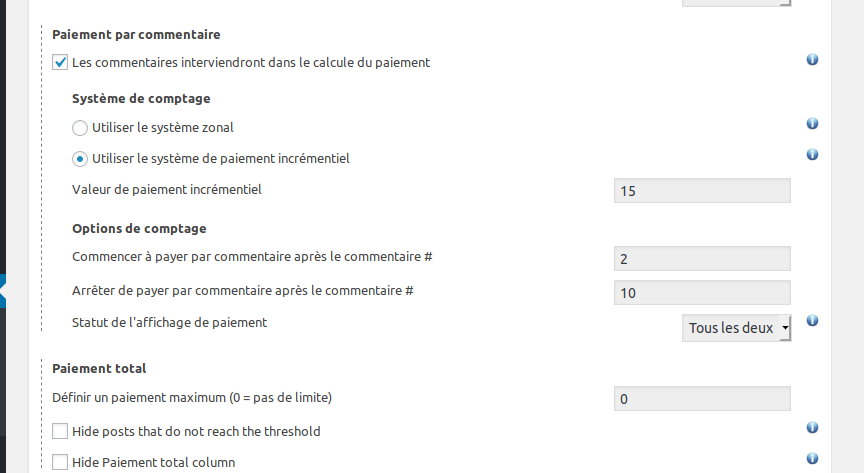
KeymasterHi, I checked. Not all posts are without comments: for example, if you look at stats for April, some comments are displayed. The reason why not all of them show up is because you have set it to pay comments after the second only (and no more after 10), see the attached screenshot. Set that to zero and it will get fixed! 🙂
Have a nice day,
StefanoAttachments:
KeymasterOh right, sure! We have shortcodes that can be used in any front-end pages to display stats, payment history and payment settings 🙂 You can find a tutorial about them here: https://postpaycounter.com/ppcp-display-stats-in-public-pages-with-post-pay-counter-pro-shortcode/
Let me know if that helps!
Have a nice day,
StefanoKeymaster1) Esempio in questo articolo WordPress conta 300 parole mentre le statistiche del plugin 402 se attivo l’opzione sono 419. Il conteggio differisce molto spesso di 10-20 parole che non sono molte ma, su un volume vasto di articoli, fanno la differenza. Non è possibile usare esattamente lo stesso valore?
No certo, il problema va risolto. Purtroppo non si può usare lo stesso contatore perchè è calcolato dinamicamente dall’editor in un altro linguaggio, ma i criteri dovrebbero essere i medesimi. Puoi riportare il testo di quell’articolo nella sua versione HTML qui entro tag code? Perchè è difficile estrarre il testo dell’articolo dalla pagina pubblica.
2) Il fatto è che non solo le visite non dovrebbero essere pagate raggiunte una soglia minima di visualizzazioni ma anche le parole scritte (ed eventuali altri conteggi). Non so se mi sono spiegato.
Ho qualcosa che feci per qualcun altro che può essere adattato allo scopo. Se hai un po’ di pazienza cerco di renderla una funzione nativa, ma ci può volere qualche giorno…
KeymasterNo, it was not in my place when you posted 🙂 I was going to check it now. Can you also provide the website?
KeymasterI honestly don’t know, this is very weird, never happened before. If you want to grant me temporary admin access to the site, I’ll be happy to have a look personally and try to fix the issue 🙂
KeymasterRight, and what is the problem exactly? Do all posts show up as having 0 comments? Can you elaborate a little more on what the problem is? Thanks!
KeymasterThe posy pay counter has one license and cant be used on staging alongwith main site. Either it should be allowed for install on one domian or give another code for development purpose. This would really mean a lot.
I have allowed your license to be active on two websites at once, trusting you that the second will be a staging one 🙂
KeymasterHi Ritesh,
If the Post has been published before (say last month) and has views during current period (this month), then it does not show in stats.
Now the alternative to it, if I select time rage this year, all post during this year with view shows in stats, but I want to pay for current views (this Month) only.Yes, this is expected behavior. I’d advise checking out this tutorial that explains how to achieve what you probably need 🙂
2. Showing Views for this (This Month / Last Month / Time Range) – ADD THIS FEATURE
If there is already a way, please let me knowQuoting from the tutorial linked above,
Why isn’t there a view for all posts that had visits this month?
Because it would drain your server’s resources. Think about it: when you have to display stats for this month, how can you know what posts had unpaid visits this month? You would basically have to go and check, one by one, what posts had visits this month. Again, this would require checking each and every post, which would kill your server every time the stats page was loaded.
I need to show user views (for their post)
Isn’t this already available? What’s missing in the current views display?
and pay on Frontend Dashboard.
This may not be too easy. Why would you need that? The person who is supposed to pay should have access to wp-admin, isn’t this the case in your situation? 🙂
KeymasterHi Rodelin,
are comments handled directly through WordPress, or do they go through some external platform (like Disqus or similar)? 🙂Have a nice day,
StefanoKeymasterIs there any way to pull a complete record of April stats from Google Analytics into Post Pay Counter?
Setting April, 1st in the Update Data feature in the Google Analytics Status box should do it. Doesn’t it work? Otherwise there may be an issue with attribution of Analytics paths to WordPress posts where the slug in Analytics doesn’t match the permalink in WordPress.
Have a nice day,
StefanoKeymasterThanks for sharing! 🙂
I have another question if you don’t mind, is there a way to disable the request button if the author didn’t have a PayPal email address saved to their profile?
Not currently, I am afraid :\
-
This reply was modified 6 years, 9 months ago by
Stefano.
KeymasterHello Ritesh,
I guess the data for old posts are not being calculated, but only those after install of plugin.
The posts that are displayed depend on the selected time range, regardless of the installation date. Doesn’t this happen?
Again I have different post formats, using standard, image quote links etc . I dont know if all of them are being calculated.
You can select different post types to be included in the Miscellanea settings box 🙂
Hope this helps!
StefanoKeymasterI have issued the refund – didn’t you get it?
-
AuthorPosts